
What is Tauri Application Upgrade?
Tauri application is an update mechanism where developers host version files in the system, suitable for scenarios that require unified system maintenance of version file release processes. It is fully compatible with the official tauri dynamic update API, allowing for quick integration. Tauri Dynamic Update
Core Concepts
Autonomous Version Hosting
Store the application's version information files (such as version.json) and installation packages (exe/dmg, etc.) in the system, allowing developers to independently manage the version release process.
Integration Flowchart
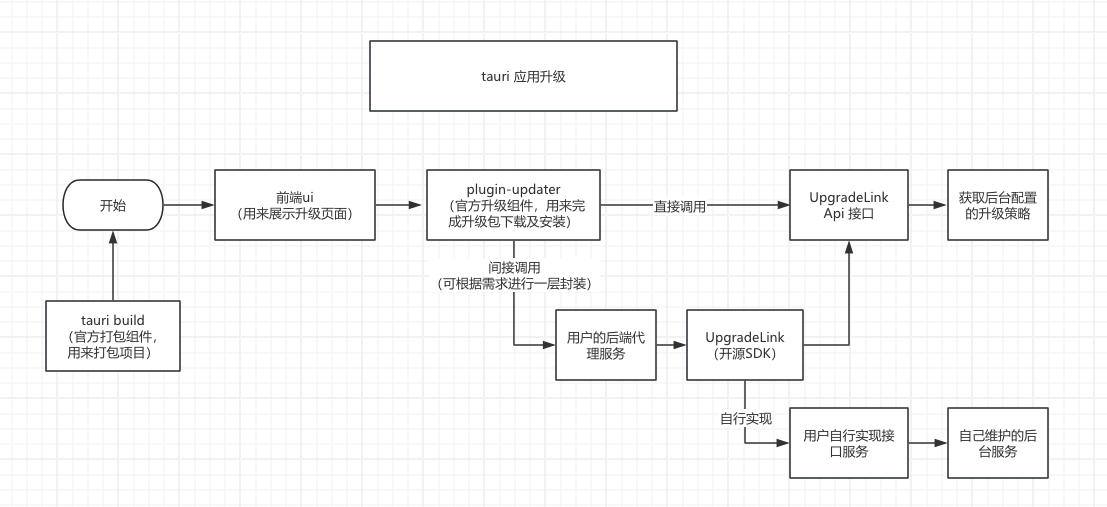
1. Core Concepts
1.1 Tauri Application Version File Hosting Platform
The core logic is to actively upload the application's "application installation package" (EXE/DMG/ etc.) or "update files" to the UpgradeLink system. The UpgradeLink system uniformly completes file storage, version management, and download link maintenance, allowing clients to actively request verification and download from the system.
Version file hosting carrier: Solely relies on the UpgradeLink system. All update files are centrally hosted by this system, eliminating the need for developers to focus on underlying operations such as file storage server construction and access stability.
2. Typical Workflow
- Developer preprocessing: Upload the application installation package or custom update file to the UpgradeLink system, which automatically generates the corresponding file identifier and download-related information (such as version number association, file metadata, etc.);
- The client modifies the configuration items of the Tauri official update component and fills in the UpgradeLink system-related information.
- Call the Tauri official update component to complete the application update.
3. Key Implementation Points
Version Hosting Configuration Specifications
- File upload requirements: The application installation package or update file must be uploaded according to the format and size limits specified by the UpgradeLink system to ensure file integrity and availability;
- System configuration points: After uploading the file, version information (such as version number, update log, etc.) must be entered in the UpgradeLink system. The system will automatically associate the file with version information and generate corresponding query and download links;
- Client configuration: In the client update module, configure the file query API address or file unique identifier provided by the UpgradeLink system to ensure the client can normally initiate requests to the system, obtain file information, and download files.
4. Advantages and Features
- Full process control: Independently decide the release rhythm, version history retention, and update strategy. File hosting and distribution are guaranteed by the UpgradeLink system, balancing control and operational convenience;
- Extremely low operational costs: No need to build/maintain any file storage or download servers. Rely on the UpgradeLink system to complete full-link file management, significantly reducing operational pressure;
- High flexibility: Support phased rollouts (achieved by configuring different file distribution scopes through the UpgradeLink system), channel-specific updates (configure multiple sets of files and version information in the system), and emergency hotfixes (quickly update corresponding files and versions in the system without adjusting the client);
- Cross-platform compatibility: The same core logic can be adapted to multiple terminals such as Windows, macOS, and Linux (requires adaptation to each system's installation permissions). The UpgradeLink system uniformly provides cross-terminal compatible download links;
- Easy reuse and expansion: The core update logic can be encapsulated as a general module. Different projects can quickly integrate by simply replacing the "Tauri application unique identifier" in the UpgradeLink system.